
There is a particular frustration in looking at a photograph, a film still, or someone else’s poster and knowing the colours are doing something you want — and having no way to say what. Eyedroppers give you a single pixel. A screen gives you a rough guess. Neither tells you what the image is made of.
Sampling is the honest version of that question, and it is easier than it looks once you understand what it is actually doing to your picture. This is a guide to reading a palette off an image without being fooled by it — because the first answer it gives you is almost never the useful one.
What “dominant colour” means, and what it does not
Dominant means most area. Nothing more ambitious than that. A wide shot of a street at dusk is mostly a dark blue-grey sky, so the dominant colour is a dark blue-grey sky, no matter how much the neon sign in the corner is the reason you took the picture.
That distinction is the whole skill. Sampling gives you a fact about the image and you have to supply the judgement. The tool will faithfully report what occupies the most pixels, and the colour that makes the image interesting is usually the one occupying the fewest.
Which means the correct workflow is not “sample, take the first swatch, done.” It is “sample, ignore the first swatch, look at what is left.”
How the sampling actually works
The image is drawn into a small buffer — 100 by 100 pixels is a common working size, and it is what this site uses. That single step throws away roughly 99.7 per cent of the pixels and keeps the general colour impression. Then each surviving pixel is rounded to the nearest coarse step on each channel, and the rounded values are counted into buckets. The six fullest buckets come back as your palette.
Three things follow from that mechanism, and each one explains a failure you will otherwise blame the tool for.
- Small details vanish. A bright red sign covering two per cent of the frame is a handful of pixels after downscaling. It may not survive at all. The tool is not broken; it was never measuring importance.
- Similar colours merge. Rounding to coarse buckets means a deep teal and a navy can collapse into one entry. That is why the results sometimes look like a colour you cannot quite point at in the image.
- Everything is an approximation. The hex values returned are bucket centres, not exact picks. They are close enough to build a palette from and wrong enough that you should not use them to match a print job.
Read it as roles, not as colours
The mistake is looking at six swatches and asking which ones you like. The useful question is which jobs they can do. A palette is a cast list: one background, one text colour, one accent, and a couple of supporting tones that stay out of the way. Six attractive colours with no assigned jobs will produce a design where everything competes, which is the most common failure mode of a colour scheme that started from a photograph.
So the moment the swatches appear, sort them three ways: which is lightest, which is darkest, which is most saturated. Those three answers determine almost everything else. The lightest and darkest become field and ink — possibly after being pushed further apart — and the most saturated becomes the accent that appears exactly once. The remaining two are support, and support’s entire purpose is to be quiet.
Once you read palettes this way, most of them stop being difficult. The colours were never the problem; the assignment was.
Why you get mud, and how to stop getting it
Mud is the signature of averaging. A photograph contains thousands of slightly different versions of each colour, and when they get rounded and counted, the middle of the distribution wins. The result is a palette of six plausible browns when the picture looked vivid.
The fix is almost always to crop before you sample. Feed the tool the region that carries the colour you are chasing — the corner with the lamp, the jacket, the sky at the moment you liked. Cropping converts a general average into a specific one, and it is the single highest-leverage move in the whole process.
The second fix is to accept that some images have no palette worth taking. A badly exposed indoor photo with mixed lighting genuinely averages to grey. That is a true report.
Finding the accent
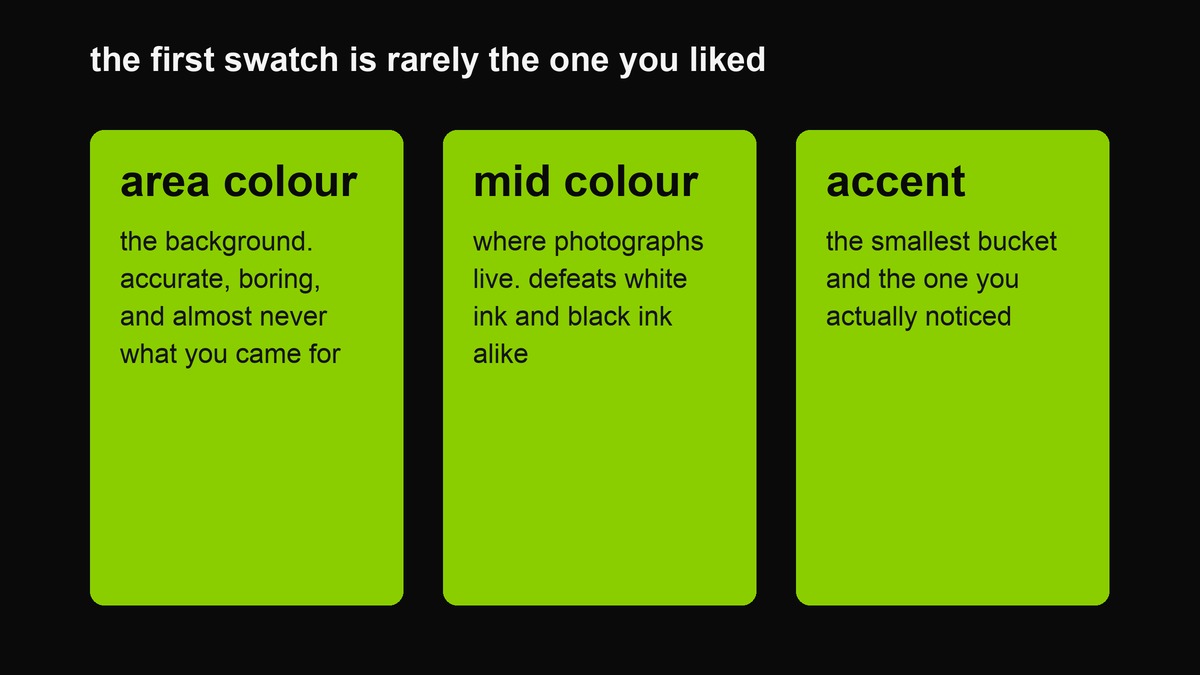 The three roles a sampled colour can play. Most people reach for the first and end up with a wall; the third is the one they actually liked.
Skip the largest area colour — that is the background, and backgrounds are why you are here. Look for the swatch that is the most saturated, the most unusual, or the one you would notice first in a shop window. That is your accent, and it is usually fourth, fifth or sixth in the list.
Once you have the accent, the palette builds itself: the accent as signal, the second-most-saturated as support, the largest-area colour demoted to a background tone, and the extremes of the lightness range promoted to field and ink. Six sampled values become six jobs, and the assignment is a design decision rather than a measurement.
The mid-tone trap
Photographs live in the middle of the luminance range. That is where detail is, and where cameras spend most of their effort — which means a colour lifted straight out of a photo is disproportionately likely to be a mid-tone, and mid-tones are exactly the values that defeat both white and black text.
This is the most common reason a screenshot-derived palette looks great as swatches and terrible as a design. The colours are fine; they are all competing for the same middle band, and none of them can serve as a field with readable type on it.
The fix is mechanical rather than artistic: push your chosen field colour towards white or towards black until it clears the contrast threshold, and keep the original as an accent. You will barely notice the shift in the swatch and you will notice it immediately in the legibility.
Ink is arithmetic
Once a field is chosen, the text colour is not a decision. Relative luminance is computed from the three channels, the two values are compared with the standard offset, and the ratio tells you whether black or white survives. Most tools do this silently; the useful ones show you the number, because the number is what lets you argue with a designer rather than nodding at them.
The thresholds worth memorising: 4.5 to 1 for ordinary body text, 3 to 1 for large headings and meaningful graphics, 7 to 1 when you want it genuinely comfortable. Anything below 3 is a colour relationship, not a text pairing — it can be beautiful, and you cannot read it.
Extending six colours into a working system
Six is a good number to start with and a bad number to design with, because you will need a hover state, a border, a disabled colour and a background that is not the field. Do not invent those. Take your existing values one step towards white and one step towards black and pick from the ladder — every colour derived that way sits correctly with the ones you already chose, because it is the same hue at a different amount.
Two habits keep the system coherent. Write the values down as soon as you have them, because a palette you cannot paste is a palette you will drift from. And cap the set — the moment a palette needs a ninth colour, what you have is a mood board.
Three worked examples
A film still. A diner at night: teal walls, warm tungsten light, a red counter. Sampling returns mostly the teal because the teal is the largest area, and the tungsten because it is bright. The colour that makes the frame is the red, and it will be last. Take the red as the accent, demote the teal to the background tone, and let the tungsten become your lightest value. Three colours, and the still is now a palette.
A shopfront. Awning green, cream signage, brick. This is the case where sampling genuinely works, because a shopfront was designed by someone — the colours are already flat, deliberate and separated. Take all six without editing and you will usually be fine. This is also the best practice case for learning to trust the tool.
A photo of your own kitchen. Six muddy browns, because it is a photograph of a mid-tone room in mixed light. The lesson is not that the tool failed; it is that your kitchen has no palette. Crop to the one object you actually like — the mug, the tile behind the stove — and sample that instead. A specific corner will always beat a whole room.
From palette to cover
- Crop the source image to the region that has the colour you want.
- Sample it, then ignore the first swatch and find the accent.
- Choose the field from the extremes of the lightness range, not from the middle.
- Let the contrast calculation pick your ink. Do not override it because you like the other one.
- Put one line of text on it and look at it small. A palette that only works at swatch size is not a palette.
- Copy the six hex values somewhere permanent, and use them for the next five things you make.
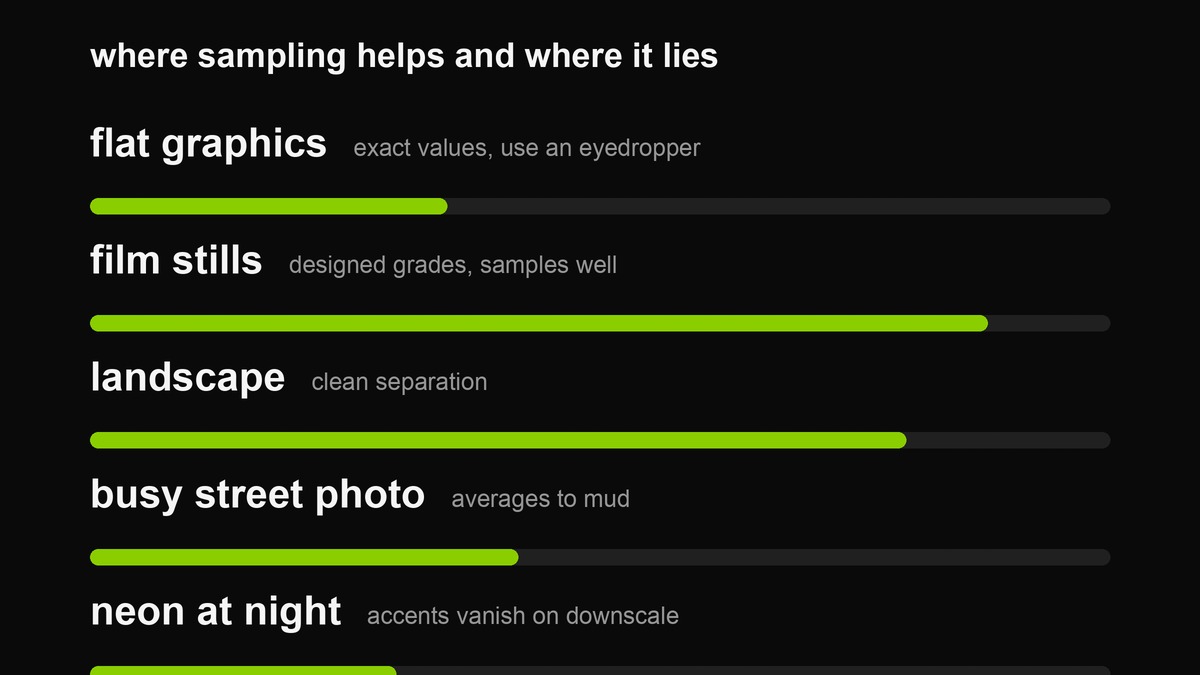 Sampling is excellent on designed images and unreliable on busy ones. Knowing which you have is half the technique.
Where this is genuinely useful
Brand work from a photograph. A shopfront, a product, a venue interior — sampling gives you the colours the subject already uses, which is a better starting point than a mood board.
Film stills. Colour grading is designed; sampling a good frame recovers the designer’s decisions rather than guessing at them.
Screenshots of interfaces you like. Not to copy them — to understand why they feel calm. Usually the answer is that they have three colours and you have nine.
Anything you cannot name. “That green from the kitchen in that one photo” is a legitimate request, and sampling is the only way to answer it.
What it is bad at
Neon and small saturated details, which downscale into nothing. Gradients, which return a muddy average of their endpoints rather than the range. Skin tones, which sample fine but should not be used as brand colours for reasons that are about people rather than pixels. And flat vector graphics with four exact colours, where sampling rounds values that were already precise — in that case use an eyedropper and read the real hex.
Testing a palette before you build on it
Three quick checks, all of which catch problems that look fine as swatches.
- The greyscale check. Convert the palette to grey. If two of your colours become the same grey, they will fight in any layout where they sit adjacent — separation needs lightness difference, not just hue difference.
- The squint check. Blur the swatches until the colours merge. You should still be able to pick out the field and the accent. If everything flattens into one mush, the palette has no hierarchy.
- The small-object check. Put the six colours into a real layout at thumbnail size — a cover with one line, an icon, a border. Palettes that look sophisticated at full swatch size frequently fall apart at 200 pixels, and 200 pixels is where your audience lives.
A palette that survives all three is worth committing to. One that fails the first is usually a photograph’s fault rather than yours, and cropping again beats pushing colours around.
A note on taking colours from other people’s work
Colours are not ownable, and a palette derived from a photograph of a room is not a copy of anything. What is ownable is a composition — the specific arrangement of type, colour, spacing and imagery that makes a brand recognisable. Sampling six hex values from a poster you admire and using them on your own layout is normal creative practice. Rebuilding their layout and swapping the words is something else, and the difference is not subtle to anyone who knows the original.
The habit worth keeping
Sampling is a five-second action and a five-minute judgement, and the gap between those two is where every bad palette comes from. The useful discipline is simple: after every sample, write down which of the six you would actually use and why. Two sentences, and it converts a random-looking set of swatches into a decision you can defend later when the design stops working and you cannot remember what you were thinking.
Keep the notes. Over a year, those little written judgements become the most useful design asset you own — a personal record of what you reached for and why, in a folder of images you can no longer interpret without help. Do that twenty times and you will have something better than a colour library. You will have a record of how you see, which is the thing a palette tool cannot give you and the reason the same six swatches look obvious to you and arbitrary to anyone else.
FAQ
Why do I get six browns from a colourful photo?
Averaging. Crop tighter to the region that carries the colour, and the buckets will separate.
Are the returned hex values exact?
No. They are bucket centres after rounding, so they approximate. Fine for a palette, wrong for matching a print specification.
Can I sample an image from a website?
Not directly in a browser tool — cross-origin protection blocks reading pixels from images you did not load locally. Save the image, then drop it in.
How many colours should I keep?
Three to five in actual use. Six is a sample; a design with six active colours is a colour wheel with a layout problem.
Why does the same image give different results twice?
Because the bucketing keeps only the fullest six, and an image with a smooth distribution can have several near-ties at the cut-off. The top few are stable; the fifth and sixth will drift. Treat the first three as the report and the rest as suggestions.
Can I use this to match a brand colour exactly?
No. Quantised sampling approximates, and screens add their own colour management on top. If you need an exact value, get it from the brand’s own guidelines or from a vector file where the value is stored as text.
Is the image uploaded anywhere?
No. It is decoded and sampled inside your browser and discarded when the tab closes. Nothing reaches a server, which is the only sensible arrangement for pictures of things that are in your house.
Related: the screenshot palette tool, the palette generator for building ladders deliberately, and the green colour page where the contrast arithmetic is laid out with a live checker.