
A screenshot is the most casual thing you post and one of the most informative. You chose the two lines you wanted people to see; the file also contains the time, the device, the app it came from, the person who sent the message, and sometimes the room you were sitting in. None of that is intentional. All of it is normal.
This is a field guide to what a screenshot actually carries, ordered by how often people miss it rather than by how damaging it is — because the frequent ones are the ones that will catch you.
Why the frame is wider than you think
Before the inventory, the underlying asymmetry: you control what you meant to show and nobody controls what else was on screen. That gap is where every accident on this list lives.
Before the inventory: the reason this list exists is that a screenshot is a rectangle of a screen, and a screen is a busy place. You chose a fragment. The file kept the neighbourhood.
The reason screenshots leak is attentional, not technical. When you capture something, your eye is on the thing you decided was worth capturing — the line, the number, the absurd headline. Everything outside that focus is, to you, not really in the picture. It is in the file.
This is why telling someone to “be careful” does not work. Carefulness does not help you notice what your attention is already excluding; the person most likely to miss the notification banner is the one who is trying hardest to look at the message underneath it. What works instead is a scan order that fights the instinct: edges before centre, corners before content, periphery before subject. It looks silly written down. It is also the only reliable method, because it is the only one that looks where you do not want to look.
The second bias is that you already know what the screenshot is about, so you evaluate it as an illustration of that thing rather than as a document a stranger will read. A stranger has no idea what you meant to show them and will therefore read everything, including the calendar in the background of the shot you took of your own desk.
The layer you forgot was in the frame
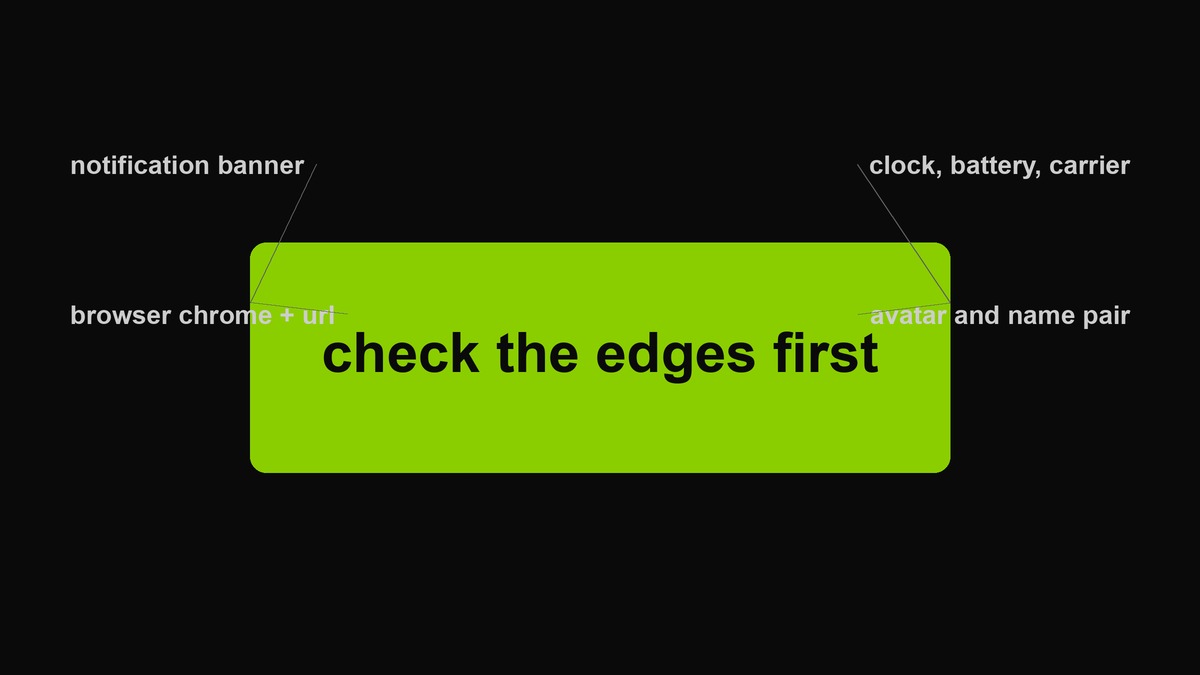 Five places information hides in a screenshot. The top-left one is the single most common accidental disclosure in the wild.
The notification banner. It arrives while you are capturing and stays in the frame for the whole second it takes to press the buttons. It carries a sender’s display name, their avatar, and the first line of a message that was not meant for the audience you are about to show it to. This is the number one thing to check, and the fix is not covering it afterwards — it is turning notifications off before you capture, which removes the temptation to remember at the wrong moment.
The browser chrome. Bookmarks bar, profile avatar, extension icons, and the URL. The URL is the one people underestimate: it identifies the account, the workspace, sometimes the document, and often contains a slug that is a person’s name.
The status bar. Time, battery, carrier, wifi. Alone, each is trivia. Together they say when you were awake, roughly where you were, and on which network — and a screenshot with a timestamp is the single easiest way to contradict an alibi or confirm a routine.
The avatar and display-name pair. Covering the @handle and leaving the profile photo is a mistake people make constantly, because the handle feels like the identifier and the face does not. Faces resolve far faster than usernames.
The background. In photos of screens, and in the reflection on the screen: a whiteboard with a client name, a second window, a street through the window behind you. Screenshots of video calls have become the modern version of this — other people’s rooms, shelves and family photos, captured because they were behind the person you were talking to.
Screenshots of other people
Most screenshot leaks are not yours to lose. A conversation includes at least one person who did not agree to be published, and the asymmetry is brutal: the exposure lands on them and the decision lands on you.
Three questions are worth asking as habit rather than as conscience. Does this person know they are being shown? A screenshot converts a private message into a public artefact without asking the author. Can they be identified by anything other than their name? A handle, a photo, a job title, a very particular way of typing, a niche interest in their profile. Removing a name is often theatre. What does this cost them? A screenshot that is funny about someone is frequently costly to them in a context you are not in — their workplace, their family, their community.
The practical middle ground is not “never screenshot conversations.” It is that the default should be covering the other person’s identity and considering whether the point survives being made that way. If the point only survives when they are identifiable, that is information about the point.
What the file says about itself
Separately from the pixels, the file carries a description. Screenshots tend to be lighter than photographs here, but not empty: capture time, display and scale information, the software that produced it, and a file name that in several operating systems encodes the date, time and sometimes the source app.
Then there are the fields you fill in yourself. Alt text is the sneaky one — it exists to make images accessible, and if you write a truthful description of a screenshot you have just published the content you were trying to hide in the image. The correct alt text for a redacted screenshot describes what the image shows after redaction, not what it used to contain.
And cropping is not deleting. Trim an image and the removed region may still be inside the file, recoverable by anyone who opens it in an editor. If you cropped something out, re-export it so the discarded pixels are genuinely gone.
Four categories where the stakes change
Work. Internal tools leak project names, ticket identifiers, colleague names, and the existence of things that had not been announced. The recipient outside the company reads the whole frame, and the most damaging part is usually the part that identifies a person rather than the part that identifies the problem.
Health. A screenshot of a results page or an appointment screen carries a name, a provider, a date and often a code that means something to someone who knows where to look. It is the category where people share most casually and least safely, usually with the best intentions.
Money. Bank screens are the classic case, and the leak is rarely the balance. It is the account number fragments, the sort code, the transaction counterparty, the visible statement month, and the fact that the screenshot proves you had an account at that institution on that day.
Location. Anything with an address, a room number, a booking reference, a check-in, a map pin, or a view out of a window. Location is the category where harmless-looking detail compounds: a hotel lobby photo plus a date plus a first name is a room.
None of these mean “never post.” They mean the check is different: for these four, ask what a stranger could assemble rather than what a friend will understand.
How often each one leaks
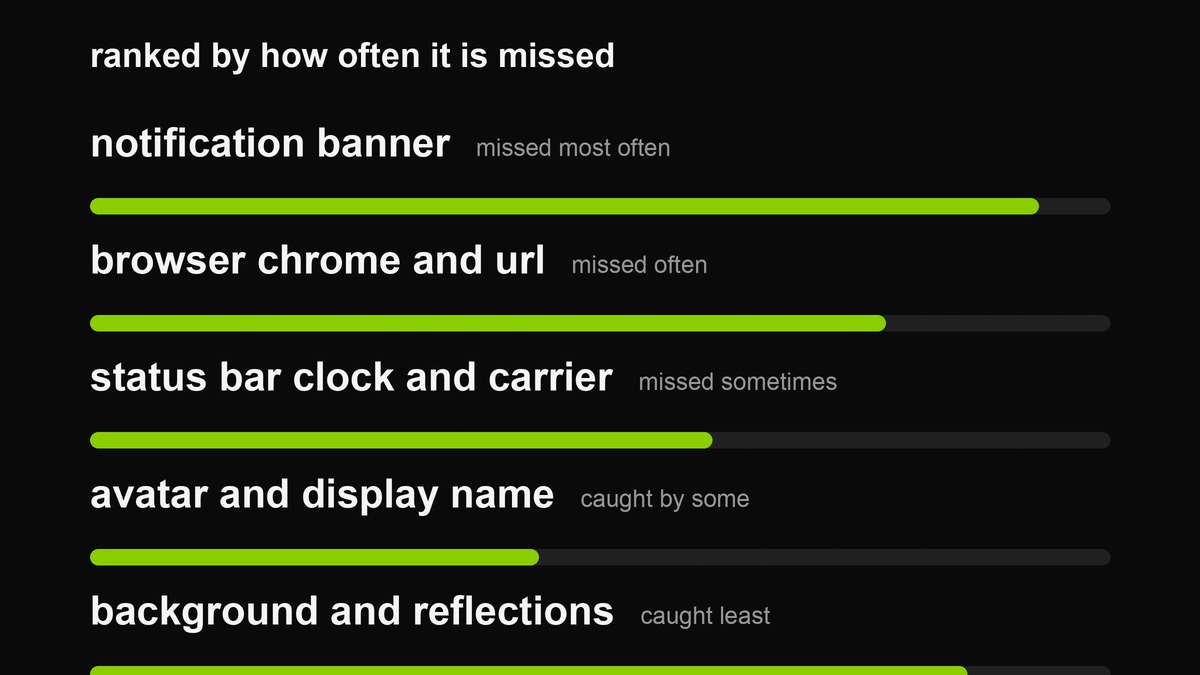 Ranked by how often it is missed, not by severity. The top two are also the two that take the least effort to prevent.
The ranking matters because prevention is not evenly costly. Turning notifications off before capturing takes ten seconds once. Scrubbing metadata after the fact takes a tool and a habit. And the most damaging leaks — someone else’s message, someone else’s face — are the ones you can only fix by noticing, which is why the checklist below is worth memorising rather than looking up.
Three situations where this stops being trivia
Journalism and research. A screenshot of a post is evidence, and evidence with a timestamp and a device is also a description of the journalist. Verify what you are sending before you send it to someone whose threat model is not yours.
Work. Screenshots of internal tools leak project names, ticket IDs, colleague names and the existence of things that were not announced. The recipient outside the company reads the frame, not just the part you pointed at.
Anything involving a stranger. A screenshot of a dating app conversation contains their face, their job title from their profile, and the distance setting — which is a location, expressed as a number. That combination has a real-world history of ending badly, and the person carrying it is usually the one who least expects it.
What a screenshot is actually good for
All of this can sound like the advice to stop posting pictures of your screen, which is not it. Screenshots are genuinely one of the best formats the internet has: they carry evidence, they preserve a moment before it is deleted, and they communicate a specific interface problem faster than any description. A bug report without a screenshot is a paragraph; with one it is a sentence.
The point is that a screenshot is a document, not a snapshot. It records more than you intended to record, and it will be read by people who have no idea which part you meant. Treat it the way you would treat photocopying a page from a file you were handed — glance at what else is on the page before it leaves your hands.
The thirty-second check before you send
- Zoom to 100 per cent and scan the edges first. Banners, bars and corners, not the middle. The middle is what you were looking at; the edges are what you forgot.
- Name every person who could be identified. Faces, handles, display names, phone numbers, workplace logos. If you would not publish it about yourself, cover it.
- Ask what the file says about when and where. Clock, status bar, calendar dates in frame, weather in a window.
- Re-export rather than re-save. A fresh PNG from a canvas carries only what is visible. That single habit removes metadata, cropped-out pixels and layers at once.
- Check the alt text you are about to write. Describe the image as it will appear, not as it was.
Building a habit that costs nothing
Checklists fail under time pressure, so the durable fix is to change the capture environment rather than your diligence. Four settings do almost all of it.
- Notifications hidden while capturing. Most systems can suppress banners on screen capture, or you can turn them off for the ninety seconds you need. This deletes the biggest single leak category by making it impossible rather than by reminding you.
- Capture a region, not a display. If you only ever take the rectangle you selected, the browser chrome and the second window cannot appear. It also produces smaller, clearer images, which is a bonus you get for free.
- A dedicated folder for exports. Screenshots that land in a camera roll get re-shared by accident. A folder you never post from makes the mistake structurally harder.
- Mark-up before share. Some systems let you annotate at the moment of capture, so covering happens while the image is still in the capture flow rather than after you have already opened the message you meant to paste it into.
The principle behind all four is the same one this whole page has been circling: do not rely on remembering to look. Arrange things so the thing you would have missed cannot appear.
What to do when you already sent it
Assume it is permanent. Delete-from-sender features do not undo a screenshot, and the recipient’s device is not yours to manage. The useful moves afterwards are boring: tell the person who is exposed, before they find out some other way; remove the original from anywhere you posted it; and change the habit rather than promising to be more careful, because carelessness under time pressure is a design problem, not a character flaw.
If it was someone else’s information rather than yours, the obligation is to them, not to your comfort level. A message that says “I posted a screenshot that included your name and face; I am sorry, here is what I am doing” is worth more than any amount of private agonising, and it is the only thing that gives them a chance to react.
FAQ
Does this apply to photos of a screen too?
More strongly. A photo of a screen carries everything a screenshot does plus the room: the desk, the wall, the window, the person over your shoulder. Reflections are the classic miss, and they are invisible in the viewfinder and obvious at full size.
Is a screenshot of a public post fair game?
Legally that is a question with a jurisdiction attached, and this page is not legal advice. The practical question is whether reposting someone’s words to a new audience is what they consented to when they posted. Public does not mean portable, and the internet has an unbroken record of people discovering that the hard way.
Do I need to scrub metadata every time?
If you re-export through a canvas, no — the new file has none of the old description. The cases that need explicit scrubbing are originals you are sending unedited, which is exactly when people forget.
Does the same apply to photos of my own screen?
More strongly, and for an extra reason: a camera adds context a screenshot cannot. The angle reveals the device, the desk and the room; the reflection reveals whatever is behind you; and the file carries capture metadata a screenshot usually does not. If you must photograph a screen, do it in a room with nothing legible behind you, and treat the reflection as part of the frame.
Is it paranoid to check this often?
Checking takes thirty seconds and prevents a category of harm that is unrecoverable once it lands. The people who consider it paranoid are, without exception, the ones who have not yet had the experience of watching something they posted travel somewhere they did not intend. The habit is cheap. The alternative is not.
What about screen recordings?
Same rules, worse, because a recording captures the moments before and after you noticed — the notification you swiped away, the password you typed, the window you switched to. Blank the desktop, close the extras, and record a cropped region rather than the whole display.
Is any of this processed on your servers?
No. The redaction tool on this site reads the file in your browser, draws it to a canvas and hands back a new PNG. Nothing is uploaded, and closing the tab forgets the image entirely.
Related: the redaction guide covers how to make a covering actually remove; the redactor does it in the browser; and the aesthetic text guide covers the separate question of what a platform’s systems read in your text.